The AI workspace for clinical research

Clinical research with AI you can check.

Lincei runs Claude Code, Codex and other agents on MIMIC-IV, eICU and your own data. Every result lands on a card with the code behind it, and decisions wait for your sign-off.

  • Free and open source
  • Uses your Claude or ChatGPT subscription
  • MIMIC-IV demo included

For Apple SiliconFor x64 · Other builds

Lincei with a Sepsis-3 conversation on the left and the agent's research cards on the right: a Kaplan–Meier curve of 30-day survival by admission SOFA band, with confidence bands and the cohort described above it.

Try asking

Ask in plain language. Get a card back.

Questions like these made the cards on this page. The first five work on the MIMIC-IV demo that comes with Lincei; the last needs a folder of chest X-rays or MIMIC-CXR access.

  • How many adult ICU stays in the MIMIC-IV demo lasted longer than seven days? A count in the chat, with the query on request
  • Build a Sepsis-3 cohort of adult first ICU stays and show the exclusion flow. Exclusion flow card
  • Compare 30-day mortality across admission SOFA bands with a Kaplan–Meier curve. Kaplan–Meier card
  • Put Table 1 by 30-day survival on the board, then let me approve the cohort. Table 1 and an approval card
  • Chart 48-hour AKI rates by first care unit, using KDIGO staging. Chart card
  • Put the chest X-rays labelled effusion or atelectasis on the board and ask me which labels look wrong. Image gallery with a question

01 Why Lincei

The agents you know, set up for clinical research.

On its own, a coding agent starts from an empty folder. It writes SQL against whatever it finds, chooses clinical definitions from memory, and reports results in a chat that scrolls away. Lincei runs the same agent with clinical data, validated definitions and a research board already in place, and tells it to work the way a study needs. You keep your subscription and your choice of agent.

What changes when you run a coding agent inside Lincei
Topic An agent on its own The same agent in Lincei
Clinical data You install Python and a database, then download and load MIMIC-IV yourself. The MIMIC-IV demo is ready on first launch. Add MIMIC-IV, eICU, notes or MIMIC-CXR with your PhysioNet login, or a folder of your own CSV files.
Definitions Writes Sepsis-3, SOFA or KDIGO staging from memory. Reads the matching one of 28 skills from M4 first, with validated definitions for the dataset in front of it.
Results Tables and plots scroll past in the chat. Each table, figure and image set lands on a card with its dataset, its script and the time it ran.
Decisions Picks a definition and keeps going. Asks when a choice would change the result, and waits on an approval card before the next step.
Patient images Can open an X-ray, which sends the pixels to the model provider. Puts the films on the board for you to read. It never opens credentialed images itself.
Language Talks in diffs, commands and stack traces. Leads with the finding in plain language. Techie mode brings the terminal back.
  • The agent app

    T3 Code

    Runs Claude Code, Codex, Cursor, OpenCode, Grok and Antigravity on your computer, with your own sign-ins. Built by T3 Tools Inc.; Lincei adds the clinical layer on top.

  • Clinical data for agents

    M4

    Turns MIMIC-IV, eICU, clinical notes and chest X-ray datasets into fast local databases, with a Python API and skills that teach agents the clinical definitions.

  • The research board

    Vitrine

    Shows what agents publish as cards that keep their provenance, collects your answers on the card, and exports a study as one HTML file.

02 Research board

Table 1 first. Then your call.

Agents publish to a board beside the conversation. Here the agent built a Sepsis-3 cohort from the MIMIC-IV demo, put Table 1 on a card, and posted an approval card after it. Modelling waits until you approve the cohort or narrow it.

The research board, maximized in Lincei. A Table 1 card compares 31 survivors and 9 non-survivors at 30 days, with the dataset and scripts under the table. Below it, an approval card summarises the cohort and offers Approve cohort and Narrow cohort.
  • Provenance on every card

    The dataset, the script that made the result and the time it ran sit under each card, ready to check or rerun.

  • Decisions on the record

    Approve a cohort or send it back from the card. Your answer and its time stay with the study, and the agent reads it from there.

  • Studies that last

    Cards stay on disk with your project, come back in later conversations, and export as one self-contained HTML file.

03 Images

Chest X-rays go on the board, not into the model.

Agents put a set of films on a card as a gallery, with captions and tags. Open a film to zoom and pan, switch overlays such as segmentation masks on and off, and answer the agent by clicking the pictures.

Lincei with a researcher's request on the left: put the NIH ChestX-ray14 films labelled effusion, atelectasis or consolidation on the board and ask which labels look wrong. On the right, the research board shows them as a gallery of chest X-rays, each captioned with its label and tagged with age, sex and view.
Films from NIH ChestX-ray14, courtesy of the NIH Clinical Center.
  • Only the films a cohort needs

    For MIMIC-CXR, Lincei asks for your PhysioNet login when an agent needs images, then downloads that cohort's films.

  • Pixels stay off the model

    Agents never open credentialed images. You read the films on the board; the agent works with file names and labels.

  • Answers on the pictures

    Click the films to answer a question. Your picks come back to the agent as data it can tally on a new card.

04 In the loop

The agent asks before it guesses.

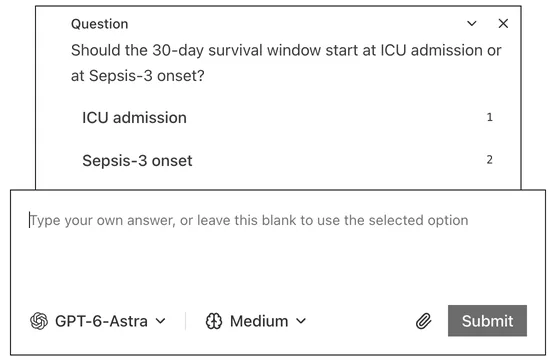
Clinical definitions are full of choices: which SOFA window, which ICU stay, when the 30 days start. Lincei tells every agent to stop and ask when a choice would change the result, and to state its cohort, exclusions and denominators when it reports.

  • Questions arrive in the conversation with answers to pick from.
  • Exploratory findings are labelled exploratory.
  • Your PhysioNet login goes into Lincei's own dialog, never the chat, and is not stored.
The agent asks: should the 30-day survival window start at ICU admission or at Sepsis-3 onset? Two answers to pick from, and a box to type your own.

05 Clinical data

Set up for clinical data on first launch.

Lincei installs its own Python environment with M4, Vitrine, pandas, DuckDB, lifelines and statsmodels. Every agent finds it, so no project needs its own setup.

From the open demo to full MIMIC-IV

The MIMIC-IV demo downloads during setup. Add MIMIC-IV, MIMIC-IV-Note, MIMIC-IV-ED, eICU, MIMIC-III or MIMIC-CXR when you have PhysioNet access, or a folder of your own CSV files. Your PhysioNet password is used once and never stored.

Settings, Clinical Data: the MIMIC-IV demo is ready to query, and MIMIC-IV, MIMIC-IV-Note and the MIMIC-IV-ED demo can be added, the first two with PhysioNet access.

28 clinical skills

Validated definitions and research methods that agents read before the matching task.

  • sepsis-3-cohort
  • sofa-score
  • kdigo-aki-staging
  • first-icu-stay
  • suspicion-of-infection
  • comorbidity-score
  • vasopressor-equivalents
  • mimic-eicu-mapping
  • clinical-research-pitfalls
  • +19 more

Private by default

No telemetry, no Lincei account, no hosted relay. Data stays on your computer unless an agent sends it to the model provider you picked. Settings, Clinical Data shows the exact instructions Lincei gives every agent.

Made for researchers

Terminals, diffs and git stay out of sight, and agents explain their work in plain language. Switch on Techie mode in Settings when you want the code.

06 Agents

Bring the agent you already use.

Lincei doesn't sell model access. Sign in to Claude Code, Codex, OpenCode, Cursor, Grok or Antigravity with your own subscription, switch between them per conversation, and Lincei runs them on your computer, next to your data. The agent support comes from T3 Code, the open-source agent app by T3 Tools Inc. Thank you to the T3 Code team.

  • Claude Codeclaude auth login
  • Codex CLIcodex login
  • OpenCodeopencode auth
  • Cursor@cursor/sdk
  • Grok CLIgrok login
  • AntigravityGoogle sign-in

Start with the MIMIC-IV demo.

Lincei is free. The AI runs on the Claude or ChatGPT subscription you already have.

  1. Download Lincei

    On first launch it sets up its own Python with M4 and Vitrine, and downloads the open MIMIC-IV demo.

  2. Sign in to an agent

    The setup installs Claude Code or Codex and signs you in with your Claude or ChatGPT account. Four other agents work too.

  3. Ask a question

    Try Build a Sepsis-3 cohort and put Table 1 on the board. Results land on cards; decisions wait for you.

Mac builds are not notarized yet. On first launch, allow Lincei under System Settings → Privacy & Security. Windows builds are not signed yet. If SmartScreen warns, choose More info, then Run anyway. On Linux, make the AppImage executable with chmod +x, then open it.